 Chordleaf
Chord sheet maker
A chord sheet maker that keeps lyrics and chords aligned
Chordleaf turns a plain lyric text into a rehearsal-ready chord sheet. Write or paste the words, drop guitar chords on the exact syllable, add diagrams and export a clean A4 PDF. There is no account and nothing to install.
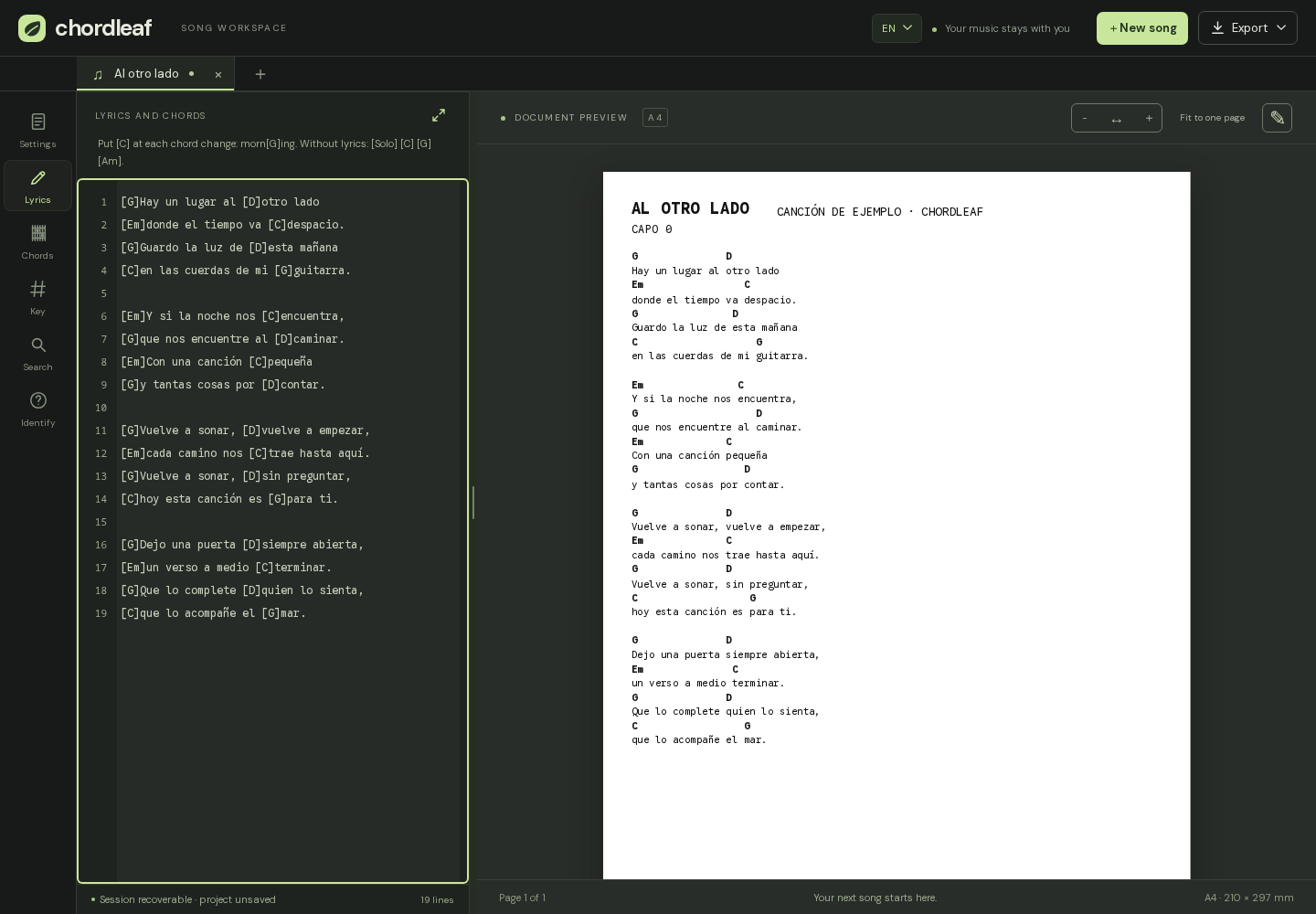
What a chord sheet maker gives you
A chord sheet maker keeps two things together that are easy to lose in a plain text file: the words and the chords that belong above them. Chordleaf stores every chord as an anchor on a syllable, so editing a line never drags the chord grid out of place.
It is aimed at guitarists preparing songs for a lesson, a rehearsal or a worship set, and at anyone who wants a readable sheet without counting spaces by hand. You can start from a blank page, paste an existing text or import a file you already have.
- Place a chord on any syllable without manual alignment.
- Look up guitar shapes and build diagrams for the sheet.
- Transpose by semitones and set a capo.
- Import TXT, PDF, Word or supported song links.
- Export A4 PDF, Word, plain text or ChordPro, plus an editable project.
Placing chords on the lyrics
Write or paste the lyrics, put the cursor where the chord changes and pick a chord from the panel. The editor records the anchor at that position, so you can rewrite a verse later and the chords stay with the right syllables.
When an imported chord is not recognised, Chordleaf keeps it and flags it for review instead of silently deleting it. You can replace it from the chord panel or save a custom shape; the final call is always yours.
The same workflow works with a mouse, a keyboard or a touch screen. On a phone the workspace swaps between lyrics, music controls and the sheet preview so each task has room to breathe.
Chord diagrams, capo and key
The chord dictionary holds guitar shapes and an interactive fretboard for drawing your own, including voicings that common dictionaries skip. Diagrams can be placed as blocks on the sheet and are distributed in columns without stretching.
The likely key is estimated from the chords you wrote. Transposition and the capo let you fit the song to your voice without touching the lyrics, and the key note tells you what actually sounds when a capo is on the neck.
From the screen to the music stand
The preview uses a real A4 page with margins, font size and one or two columns. Adjust those values and check the result before exporting; what you see in the preview is what comes out.
The export menu produces a print-ready PDF, a Word document, plain text and ChordPro (.cho), in addition to the .chordleaf.json project for later edits. Printing from the browser uses the same layout: white background, no editor chrome and page breaks where they belong.
Free, open source and local-first
Chordleaf does not ask for an account and does not upload your songs. Work is stored in your browser's local storage on this device.
Export the .chordleaf.json project as a backup and reopen it whenever you want. Clearing the browser data removes those local songs, so save the project or the PDF when the arrangement matters.
Installed as a web app, the editor opens offline after the first visit and keeps working with whatever is already stored on the device.
Frequently asked questions
Is Chordleaf free?
Yes. It is an open source project under the MIT licence, with no ads and no paid tier. You can read the code on GitHub.
Do I need an account or an installation?
No. It runs in the browser without registration. You can install it as a web app if you want a shortcut and offline access.
Can I bring songs I already have?
Yes: paste the text, import a TXT, PDF or DOCX file, or use a supported link from Cifra Club, LaCuerda or Ultimate Guitar. The import guide explains all three routes and the manual fallback.
Where are my songs stored?
In your browser's local storage. They are not synchronised across devices and Chordleaf does not show them to anyone else. Export the project to keep a backup.