 Chordleaf
Printing and PDF
Printable chord sheets that read well on a music stand
A chord sheet works when it can be read at a glance. Chordleaf lays the song out on a real A4 page, lets you tune the font size, margins and columns, and exports a white-background PDF without the editor interface.
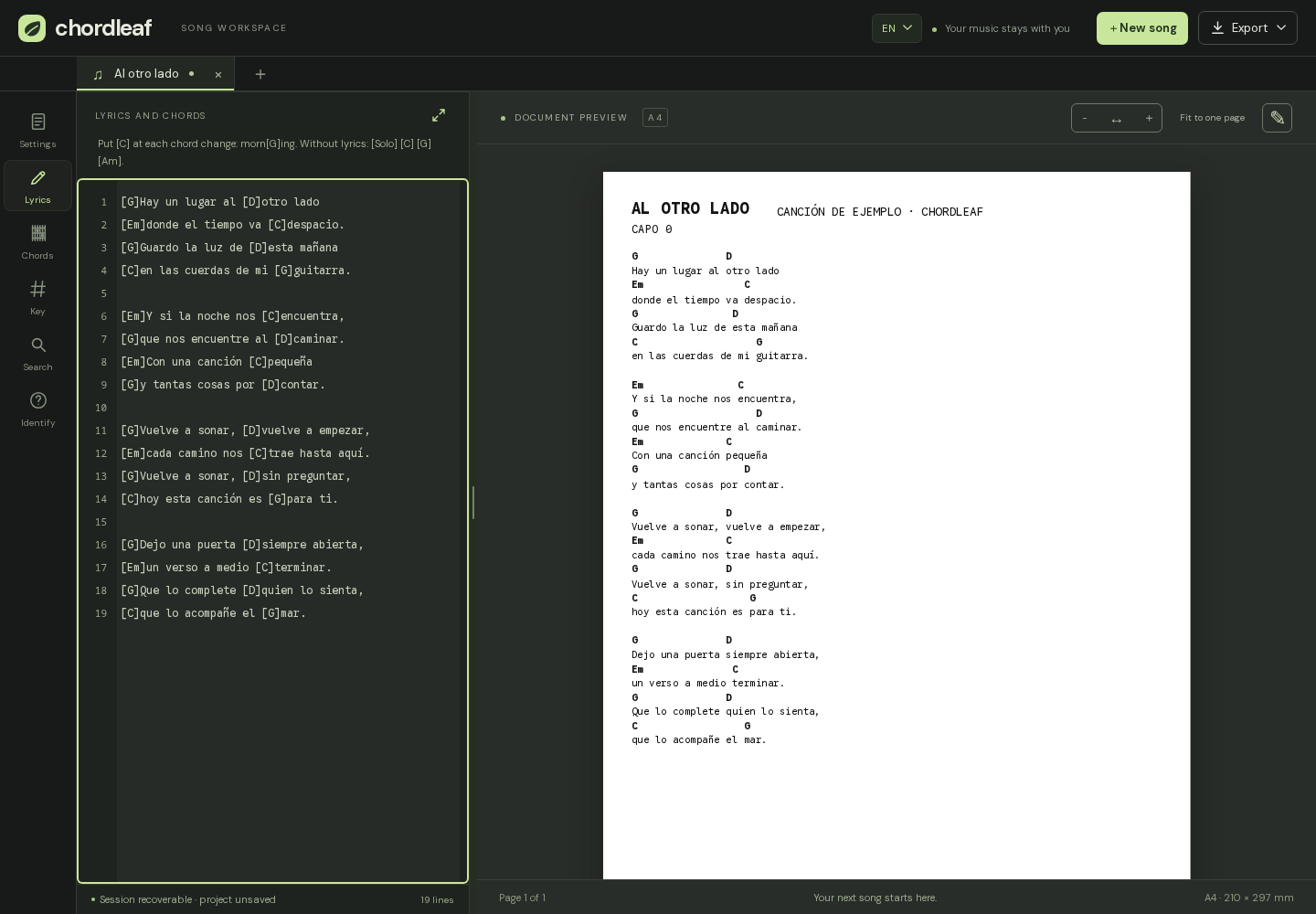
A real A4 page, not an approximation
The editor works on an actual A4 page measured in points, so the preview is the document that gets exported. Zoom in and out to inspect details, or fit the width on a phone while you check the layout.
Each song keeps its own page format. A ballad with large type and a single column can live next to a dense song in two columns without reconfiguring the editor every time.
Settings that change how the sheet reads
Font size, margins and column count have the biggest effect on legibility. Start with the defaults, print one test page and adjust from there; a slightly larger font or a smaller margin usually solves a tight song.
- Size: 7 to 20 pt to fit the lyrics on paper.
- Margins: 5 to 35 mm when a song needs more room.
- Columns: one reads well standing up; two make better use of the page for long songs.
Placing chord diagrams on the page
Diagram blocks are page objects rather than loose images. Drag a block with its handle, change its width, height and column count, and the lyrics flow around it instead of disappearing underneath.
Before exporting, the editor checks that no block covers the header or runs past the footer and warns you when one needs to move. Fixing it on screen beats discovering it on paper.
From the preview to paper
The Export menu produces an A4 PDF you can save or send to a printer. Print opens the browser dialog with the same layout, a white background and no toolbars.
The PDF and Word files carry the title and artist in the header, plus the optional chordleaf.com footer that you can switch off under More options. Check the first page before printing the rest.
- Does the song fit on the pages you expected?
- Are the chords sitting over the right syllables?
- Can you read the lyrics from where you stand?
- Are all diagrams present and clear of the text?
Notes for real music stands
Most rehearsal sheets end up printed in black and white, and that is fine: contrast comes from the type and the chord placement, not from colour.
For a long song, two columns at a moderate size often fit on one side. When you share the sheet with a band or a class, the PDF is the faithful version. Keep the .chordleaf.json project if you may want to adjust the layout later.
Frequently asked questions
Does printing use the full A4 page?
Yes. The layout targets A4 with configurable margins, and the Print entry in the Export menu hides the interface and paints the sheet white.
How do I keep a song from splitting across pages?
Reduce the font size, adjust the margins or switch to two columns. The editor shows where the breaks land so you can move them before printing.
What is the difference between PDF and Print?
The PDF is an A4 file you can store or share; Print sends the same design through the browser's print dialog.
Can I remove the chordleaf.com footer?
Yes. It is on by default and can be switched off under More options in the document settings; the preview, PDF and Word file all follow that choice.